PowerPack Addons for Elementor 3.0.0 is here! 🎉
This is a major release with quite a few things to explore. We’ve introduced two new widgets, completely rebuilt the PowerPack dashboard, improved galleries, grids, sliders, popups, and accessibility, and replaced several older third-party libraries with lighter solutions built by our team.
There are also plenty of smaller improvements and fixes across the plugin.
Let’s take a closer look at what’s new in PowerPack 3.0.0.
New PowerPack Widgets
PowerPack 3.0.0 introduces two new widgets: Event Calendar and Slide Menu.
Event Calendar Widget
Adding events to your website usually means finding a way to keep your website and event information in sync.
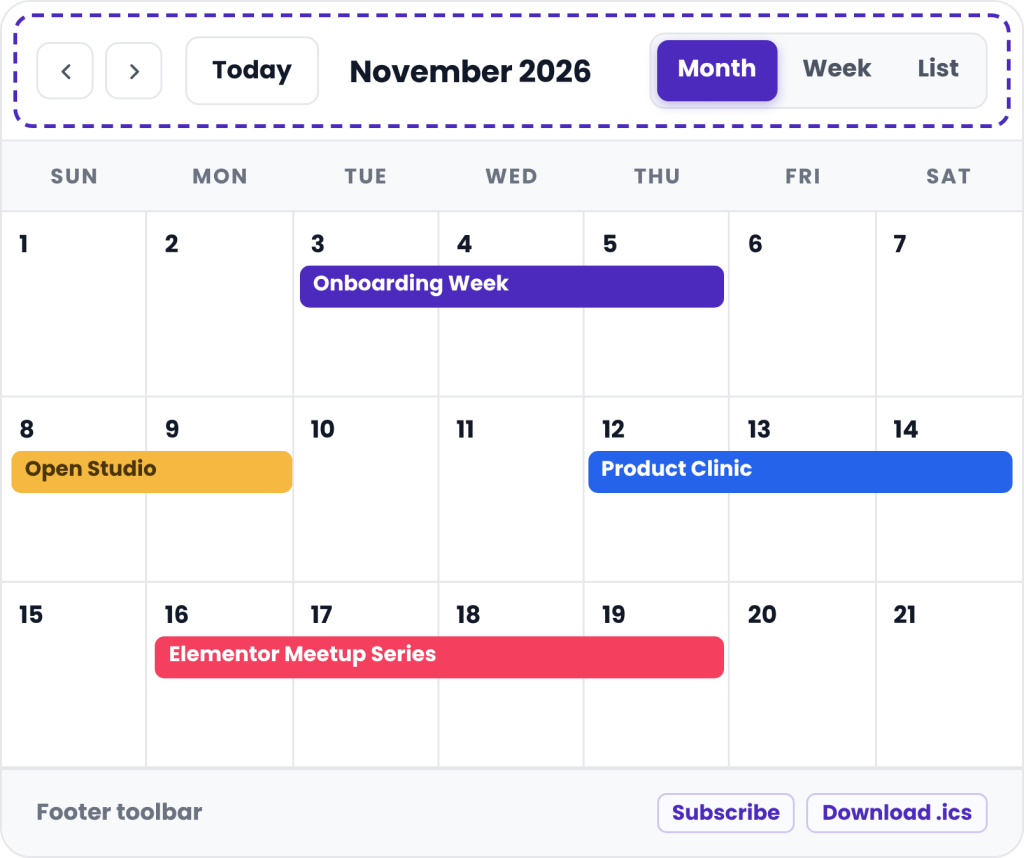
The new Event Calendar widget gives you a simple way to display events on your Elementor website, with three different ways to add your event data.
- Add Events Your Way: You can choose from:
- Custom: Add events directly inside the widget. You can add the event title, speaker or guest, location, start and end time, all-day events, and an event link.
- Posts: Use existing WordPress posts as your event source.
- Google Calendar: Connect a Google Calendar and automatically display your events on your website.
- Multiple Calendar Views: Visitors can view your events in different ways, including:
- Day
- Week
- Month
- Year
You can also choose which views are available to visitors.
Want to show more information when someone clicks an event? You can open events in a popup, send visitors to the event link, or turn off the click action altogether.
The popup also comes with multiple layouts and options for controlling the information displayed in its header.
Explore the Event Calendar Widget >>
Slide Menu Widget
Large navigation menus can quickly become difficult to use on smaller screens.
The new Slide Menu widget is designed to make those menus easier to navigate.
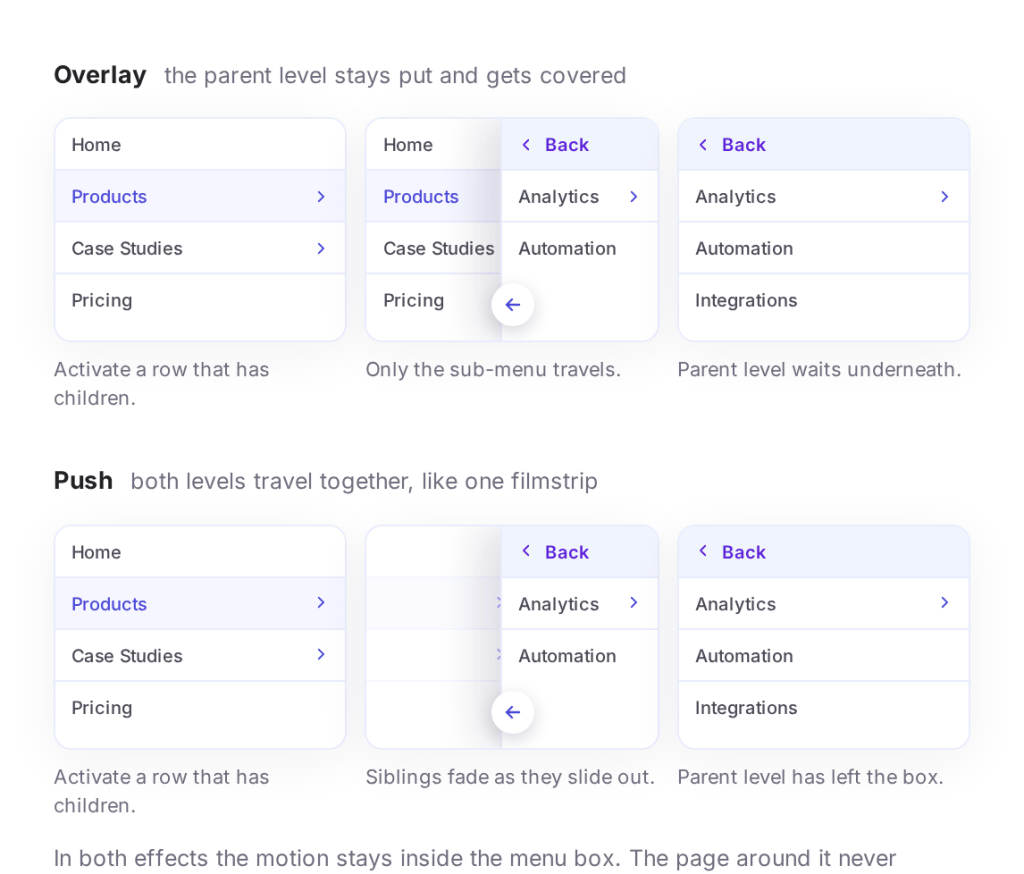
Instead of opening submenus underneath the current menu, Slide Menu allows each submenu to slide into view. Visitors can then use a back link to return to the previous level.
You can use an existing WordPress navigation menu, so there’s no need to recreate your menu structure.
Control How Your Menu Works
Slide Menu gives you control over:
- Slide direction
- Menu depth
- Item descriptions
- Submenu behavior
Panels can slide in from the left, right, top, or bottom.
You can also choose how many menu levels to display, from a single level to four levels, or show the complete menu structure.
If sliding panels aren’t what you’re looking for, you can switch to an accordion layout and let submenus expand within the current panel.
We’ve also paid attention to keyboard navigation. When a submenu opens over its parent, hidden items are removed from the keyboard tab order so visitors using a keyboard don’t accidentally tab through links they can’t currently see.
Explore the Slide Menu Widget >>
A Completely New PowerPack Dashboard
One of the biggest changes in PowerPack 3.0.0 isn’t a widget at all.
We’ve completely rebuilt the PowerPack Addons dashboard.
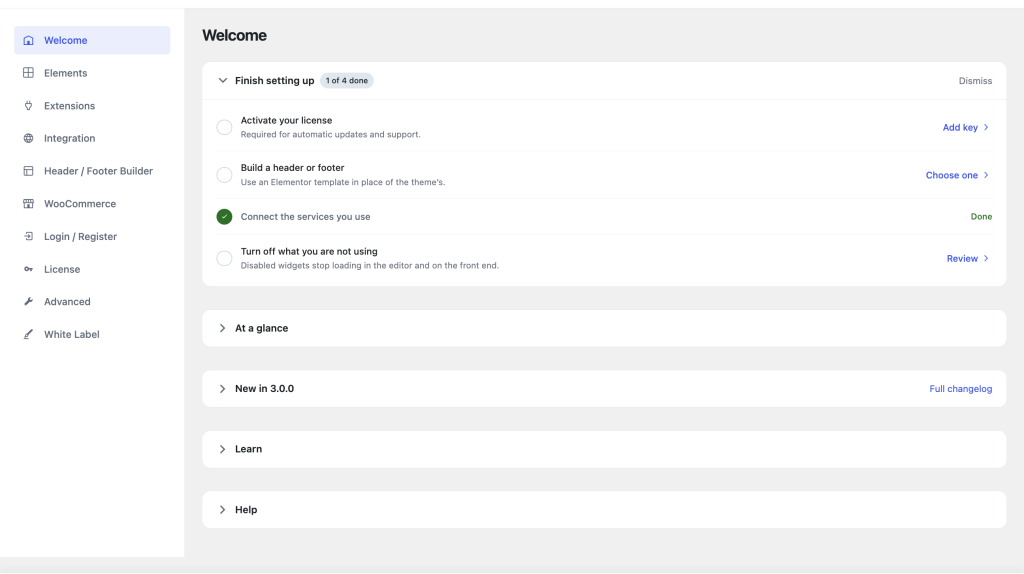
The previous settings screen had grown over time and was based on traditional PHP forms. With 3.0.0, we’ve moved to a React-based application powered by a REST API.
That means a faster experience, fewer page reloads, and a much easier way to manage PowerPack.
A Welcome Tab That Helps You Get Started
The new Welcome tab gives you a quick overview of what needs your attention.
Instead of searching through various settings pages, you can find important setup information in one place and access the right settings faster.
Find the Widgets You Actually Need
PowerPack includes 70+ widgets, and finding a specific widget can sometimes take a little time.
The new Elements tab makes this easier.
You can browse your widgets, filter them by your website usage, and quickly access widget demos and documentation.
One particularly useful option is the ability to see which PowerPack widgets your website is actually using.
This makes it easier to review your setup and identify unused widgets.
More Control for Agencies
We’ve also expanded the White Label options in the new dashboard, giving agencies more control over how PowerPack appears to their clients.
Want a closer look at the new dashboard? We’ve covered everything in detail in our dedicated post: Introducing the New PowerPack Dashboard.
Galleries and Grids Get a Major Upgrade
A lot of work in this release happened behind the scenes.
Several PowerPack widgets previously relied on Isotope for masonry layouts. While it worked, it could sometimes cause issues within the Elementor editor, such as overlapping items and layouts that didn’t look right at first.
For PowerPack 3.0.0, we’ve removed Isotope and replaced it with a lightweight masonry engine built specifically for PowerPack.
This new system:
- Lays out content immediately
- Reduces layout shifts
- Removes a large third-party JavaScript dependency
The widgets affected include:
- Image Gallery
- Video Gallery
- Advanced Posts
- Testimonials
- Instagram Feed
The old Isotope library alone accounted for more than 3,500 lines of JavaScript, so removing it makes a meaningful difference to the codebase.
Moving to Elementor’s CSS Grid
We’ve also updated the grid system used by several widgets.
Image Gallery, Video Gallery, Advanced Posts, Testimonials, and Woo Products have moved from PowerPack’s older float-based grid to Elementor’s CSS Grid
This makes column and spacing behavior more consistent with Elementor’s native widgets.
Fixes and Security Improvements
PowerPack 3.0.0 includes several fixes, including two security-related improvements. Some notable fixes include:
- Toggle labels with special characters displaying as raw HTML entities
- Incorrect fallback image sizes in Tiled Posts Layout 6
- Empty category containers appearing when posts had no categories
- White Label settings not being respected inside the Elementor editor.
- Duplicate element IDs when multiple Modal Popups were used on the same page
The security fixes improve code security across several image widgets, including Image Gallery, Image Slider, Showcase, Album, Tabbed Gallery, and Random Image, as well as Image Gallery’s Load More request.
Update to PowerPack 3.0.0
PowerPack 3.0.0 brings together a lot of changes: two new widgets, a completely new dashboard, better galleries and grids, improved sliders and popups, accessibility improvements, new widget features, fixes, and a cleaner codebase.
Read the complete change logs here!
Update to PowerPack 3.0.0 and explore the new features.
Have questions or run into an issue? Let us know in the comments or reach out to our support team.

2 thoughts on “PowerPack Addons for Elementor 3.0.0 Is Here: New Widgets, a New Dashboard & More”
Looks great! For some reason my site wouldn’t update – I’ve had to download V3.0 and upload it manually. Any ideas why that would be?
Hi Melanie
The issue was fixed today in the morning. Could you try updating PowerPack again?