Marquee Widget for Elementor

Create Eye-Catching Scrolling Content in Seconds

Want to make your content stand out and draw attention instantly?

PowerPack Marquee Widget lets you add beautifully animated, scrolling sections to your Elementor pages.

What Is a Marquee, and Why Should You Use It?

A marquee creates a scrolling effect like moving text or images across your screen. You’ve likely seen it in action on news sites or e-commerce banners. It’s a great way to add motion to your content and keep your users engaged without overwhelming them.

For example, you can create a horizontal bar that scrolls “Free Shipping on All Orders Over $50”across the top of your page, a subtle yet effective attention-grabber.

Choose Your Content Source

Marquee widget gives you two simple ways to add content.

Custom

Manually add text or upload images. Ideal for static messages like sales banners, featured logos, or branded taglines.

Posts

Automatically pull content from your WordPress posts. Perfect for showcasing blog highlights, news updates, or featured products, and it updates dynamically as your content changes.

Marquee Widget with Custom Content

⭐ New Arrivals
🏷 Up to 50% Off
✨ Free Gift on Orders $75+

Marquee Widget with Posts

Scroll Text, Images, or Both

You’re not limited to just one content type. Our Marquee Widget for Elementor supports both Text and Images.

You could scroll a line of testimonial snippets or rotate a row of sponsor logos in a sleek loop, all with just a few clicks.

Smart Content Filtering with Query Control

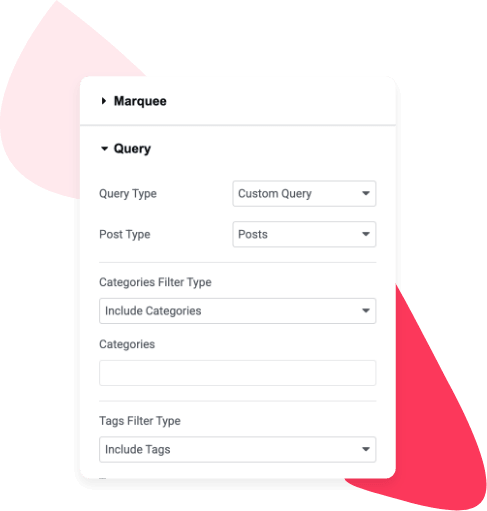
When using the Posts source, the widget doesn’t just pull every post. You can filter content based on Categories, Authors, and other custom conditions.

Let’s say you want to show only posts from the “Deals” category. Simply set the query, and the widget will handle the rest. No manual updates are required.

Control Every Detail with Advanced Settings

Get complete control over the marquee behavior with easy-to-use settings:

News
Updates
Offers
Events

Direction

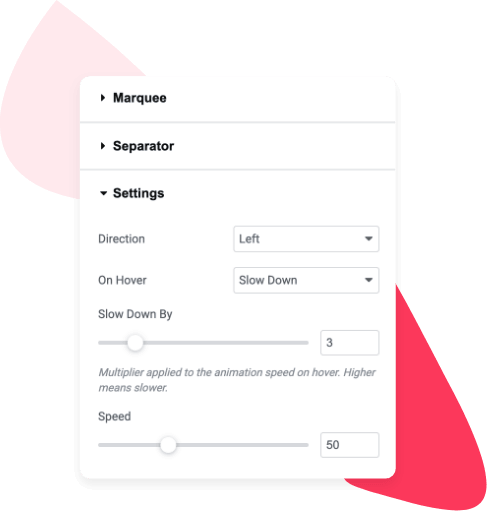
Choose how the content moves left, right, up, or down. Want a vertical list of upcoming events? Just switch to vertical scroll.

🎯
🚀
💎

Speed

Adjust how fast or slow the marquee scrolls. You can match the pace with your content fast for quick notices or slow for longer messages.

Hover me
Try it
It pauses
Smooth stop

Pause on Hover

When users hover over the marquee, the scrolling stops. This small detail improves readability, especially for longer messages or interactive content.

Marquee Widget in Action

Display a “Now Hiring – Apply Today!” banner across your careers page

🎯 Now Hiring – Apply Today!
🚀 Join Our Team
💼 Multiple Openings
🌍 Remote-Friendly
✨ Great Benefits
📬 Send Your Resume

Scroll customer reviews to build trust on your landing pages

Feature your latest blog posts or offers dynamically on any section

Built for Elementor, Beginner Friendly, No Code Required

PowerPack Marquee Widget is designed to work seamlessly within Elementor’s drag-and-drop builder. You’ll find all customization options right in the panel, with no custom code or shortcodes involved.

Take Your Designs from Static to Stunning

With the PowerPack Marquee Widget, you can instantly add movement, grab attention, and elevate your Elementor designs. It’s the perfect solution for highlighting key information in a modern, stylish way.

Download PowerPack Free

Subscribe to receive latest updates, announcements, offers, deals & discounts.